设置Hexo 在 _config.yaml 中配置: 1 2 3 4 post_asset_folder: true marked: prependRoot: true postAsset: true
上述配置后,Hexo将会在你每一次通过 hexo new [layout] <title> 命令创建新文章时会自动创建一个同名文件夹。 可以将所有与你的文章有关的资源放在这个关联文件夹中,可以通过  的方式来引用它们。
举个例子:
使用 hexo new post test 后,会在 source/_posts/ 下创建 test.md 文件和 test 文件夹,在 test 文件夹中放入 1.png,目录结构如下:
1 2 3 4 source/_posts ├── test.md └── test └── 1.png
在 test.md 中可以使用  方式引入,但这样就在 Typora 和其它编辑器中就无法本地预览图片。
解决方案一: 打开 node_modules -> hexo-render-marked -> lib -> render.js 并修改:
1 2 3 4 5 6 7 8 9 10 11 12 13 14 15 16 17 18 19 20 21 22 23 24 25 26 27 28 29 30 31 image (href, title, text ) { const { hexo, options } = this ; const { relative_link } = hexo.config ; const { lazyload, prependRoot, postPath } = options; if (!/^(#|\/\/|http(s)?:)/ .test (href) && !relative_link && prependRoot) { if (!href.startsWith ('/' ) && !href.startsWith ('\\' ) && postPath) { const PostAsset = hexo.model ('PostAsset' ); const fixPostPath = join (postPath, '../' ); const asset = PostAsset .findById (join (fixPostPath, href.replace (/\\/g , '/' ))); if (asset) href = asset.path .replace (/\\/g , '/' ); } href = url_for.call (hexo, href); } let out = `<img src="${encodeURL(href)} "` ; if (text) out += ` alt="${text} "` ; if (title) out += ` title="${title} "` ; if (lazyload) out += ' loading="lazy"' ; out += '>' ; return out; } }
参考 Github 仓库有关于此问题的 Issue : #216
提示:因本方案是直接修改 node_modules 下的 hexo-renderer-marked 源文件,所以一般不会被 git 追踪,而且在更新插件后会覆盖掉修改,所以这个改动h很跨设备同步。
解决方案二: 在项目根目录新建 scripts/fix-post-asset-path.js 并写入下面代码:
1 2 3 4 5 6 7 8 9 10 11 12 13 14 15 16 17 18 19 20 21 22 23 24 25 26 27 28 29 30 31 32 33 34 35 36 37 38 39 40 41 42 43 44 45 46 47 48 49 50 51 52 53 54 55 56 57 58 59 60 61 62 63 64 'use strict' ;const { encodeURL, url_for, escapeHTML : escape } = require ('hexo-util' );const { join, dirname } = require ('path' ).posix ;const INTERNAL_LINK_REGEXP = /^(#|\/\/|http(s)?:)/ ;hexo.extend .filter .register ('marked:renderer' , renderer => const originalImage = typeof renderer.image === 'function' ? renderer.image : null ; renderer.image = function (token = {} ) { const { href = '' , title, text } = token; const { options } = this ; const fallback = (call (this , token) : '' ); if (!options || !options.hexo ) { return fallback (); } const hexoInstance = options.hexo ; const { relative_link } = hexoInstance.config ; const { lazyload, figcaption, prependRoot, postPath } = options; let resolvedHref = href; const needsAssetLookup = !INTERNAL_LINK_REGEXP .test (resolvedHref) && !relative_link && prependRoot; if (needsAssetLookup) { if (!resolvedHref.startsWith ('/' ) && !resolvedHref.startsWith ('\\' ) && postPath) { const PostAsset = hexoInstance.model ('PostAsset' ); if (!PostAsset ) return fallback (); const normalized = resolvedHref.replace (/\\/g , '/' ); const lookupBase = dirname (postPath); const asset = PostAsset .findById (join (lookupBase, normalized)); if (asset) { resolvedHref = asset.path .replace (/\\/g , '/' ); } } resolvedHref = url_for.call (hexoInstance, resolvedHref); } let out = '<img src="' ; try { out += encodeURL (resolvedHref); } catch (err) { out += resolvedHref; } out += '"' ; if (text) out += ` alt="${escape (text)} "` ; if (title) out += ` title="${escape (title)} "` ; if (lazyload) out += ' loading="lazy"' ; out += '>' ; if (figcaption && text) { return `<figure>${out} <figcaption aria-hidden="true">${text} </figcaption></figure>` ; } return out; }; return renderer; });
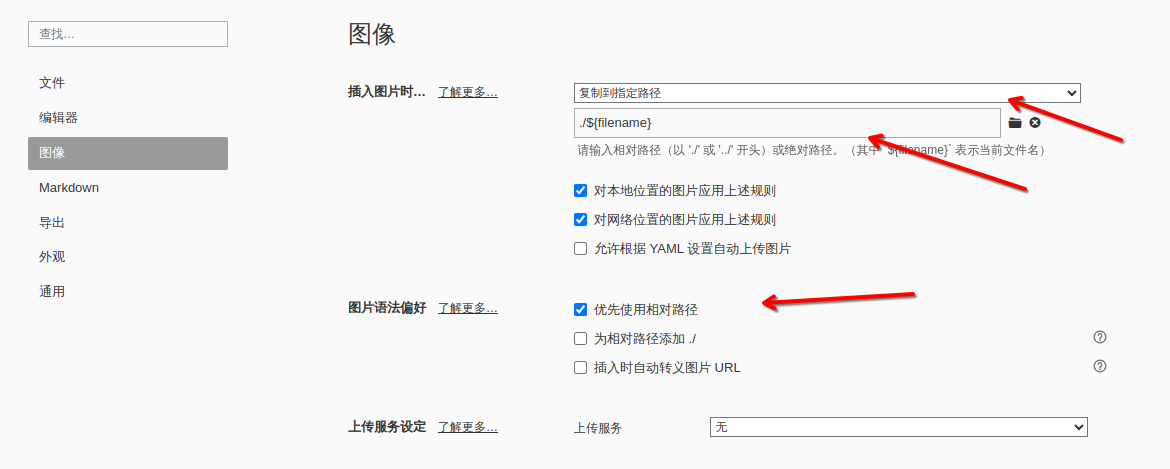
设置Typora 在 Typora 左上角 文件 -> 偏好设置 -> 图像 中进行如下配置:
这样就可以在 Typora 中直接粘贴图片时,会自动把图片复制在同名文件夹中,如果没有文件夹就会创建文件夹。